My weekender neighbors S&L have one of these:
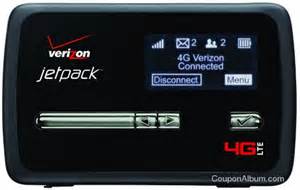
And they lent it to me over the weekend, and it’s just the slickest thing I’ve seen since my first glimpse at a wireless laptop. I’ve never really seen one before. Landlady has had one for years, but till now I paid no more attention to it than Little Bear would. I know I keep saying this but it just never gets old to me: I’m sitting in a frickin’ cabin in the frickin’ desert, probably sixty miles from the nearest latte, and we’re having this conversation through the auspices of a little plastic box that’s not plugged into nuttin’. When I found out it could be done with a modem and satellite dish, I thought that was cool. Now it seems kinda hillbilly.
But the truth is it doesn’t always work very well. In fact it usually doesn’t work very well. And that’s because of the signal strength, which is two bars at best no matter where I go around here. (And I’ve tried it at a few locations.) This morning for some reason it’s connecting with lightning speed, but it’s definitely not to be trusted. I’m going to try another version (Landlady’s) in a couple of days and maybe that will give better results but my question in the meantime is this: Has anybody here used any gadgetry, an antenna or something, that will effectively boost a cellular signal and make one of these work for me? I’ve seen them advertised, like this one…
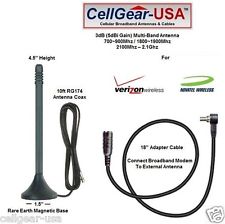
…but advertising a gadget doesn’t express or even convincingly imply that said gadget actually works, y’know? So does anybody out there have any experience with it, and can you tell me what works and what doesn’t?
I don’t have the battery time to properly research this myself because I’ve got the little box but no charger and expect it to crap out any second now, and the question didn’t occur until I woke up this morning. Talk to you in a few days.















Next time you get a chance, you might pose this question at The Mental Militia. I’m sure one of the folks there would be able to fill you in on this, and maybe even propose something better. Worth a try. 🙂
I have used Solidsignal for this before and the tech support has even recommended a lower priced solution.
I still use a wi-ex booster and a good directional yagi antenna that I got from them when I lived over 40 miles from a tower. This was about 5 years ago. The antenna that came with the booster was not up to snuff, once the yagi was hooked up and pointed at the tower most of the time it was full bars.
Talk to their tech support, they know what they are doing.
But data is different than voice and I was only interested in voice.
http://www.solidsignal.com
In keeping with the Desert Hermit/Po-Folk/DIY theme of ‘The Gulch’, I submit the following for concideration:
http://www.turnpoint.net/wireless/cantennahowto.html
I have a couple of used magnetic-mount antennas that were used with broad-band dongles and the JetPack – there should be a small antennae jack/socket on the JetPack somewhere – let me know, I’d be happy to send you one of them!
That Cell Gear is the one I use on mine, bought it off Amazon, I think. It works pretty good, once you get it up in the air.
Phssthpok — Now that’s hillbilly! But very cool.
Thanks Phssthpok, that looks very useful.
I used to have one of the 3G USB dongles, It was pay up front, and the provider was an absolute sod for throttling the speed. I ended up doing my surfing at 3AM when the speed was half decent. I think a good part (?all) of the problem was that the state had awarded a monopoly to that supplier.
From browsing review sites, WIlson electronics seems to be the preferred brand of techies everywhere – they’ve got by far the best reviews on CNet, Examiner and Amazon. They’re pricey, though!
Not sure the brand but cell boosters are used extensively out in the oil field around here. Results vary, but my phone was on “emergency only” at several well sites, but when I went into the “company man’s” trailer where there was a cell booster I had 4 bars.
I second the recommendation of Solid Signal for cell-signal boosters.
I’ve been considering getting a MiFi device from Freedompop. Its practicality for you would depend on the availability of Sprint 3g or Sprint WiMax 4g in your parts.
With FreedomPop, the device is a discounted refurb, the monthly fee for the basic service is with up to 500 watchamacallits of data is either free or $4, depending upon whether reliance on 4g is an option or you really need to pay money for 3g. They get their money from add-on services that you have to be fairly attentive to not-signing-up-for at the outset, and from data overages.
I’m considering it because I know my usage when I travel would not ever be likely to exceed the point where overages apply. I’m sure for the user that likes music, graphics intensive stuff, or TV and movies, there are lots of cheaper options per MB
As for boosting cell signals, been there, done that, at my gulch.
Short answer: the $89.95 solutions are crap and do nothing except lighten your wallet.
The solution that worked cost about $1600; $1200 for the booster electronics box, $200 for a highly directional antenna to point at the nearest cell tower (about 10 miles), $150 for low-loss coax cable, and $50 for an omni antenna to re-broadcast the cell signal around the property.
Arranging the omni antenna so that it did not “see” the directional antenna was crucial, and took a bit of work.
That solution raised my signal from 0-1 bar tops, with no call lasting even 2 minutes without a drop, to 4-5 bars typical and fine quality. But it wasn’t cheap.
I personally have a FreedomPop, which is a refurbed Sprint device running on Sprint 3G, and it works reasonably well for the $20 I paid for it and the $0 a month for 500MB I use.
Here’s a good comparison article:
http://lifehacker.com/5974761/how-to-choose-the-fastest-cheapest-and-most-reliable-mobile-hotspot-to-stay-connected-everywhere-you-go
It’s from January, so you’ll want to look closer at coverage maps, but it lists everony that’s out there.
On the basis of two recommendations I’ve gambled $50 on a freedompop gadget just to see if it works. Film at eleven.
Ok, I’m using the exact Jetpack and booster you show to send this. Here’s my thoughts.
I’m in the boondocks of the upper Mississippi valley and this is about the only thing available. With the booster I get 4 bars and can use it. The booster adds 2 bars. Don’t get the bigger antenna that’s sometimes offered as a package. the connections are not compatible. The booster/Jetpack does use some power so turn it off when not in use.
I had a hell of a time with it at first, and second because it kept going from 3G to 4G to 4g dormant at which point it didn’t work. The Verison techs were great with everything except fixing the problem. For some reason they are not allowed to provide a fix I found that online.
To keep it in 3G and constantly working there’s an easy fix which you can Google (when it worked). Now I have no problems. Not real fast but ok.
I had to increase my monthly usage to 6 gigs and I don’t do much of anything but email and surf. No video but still need that much bandwidth. No clue why.
Good Luck
PS
The Jetpack is $100. To get the $50 rebate you have to send in a bunch of BS. Verizon does not want to send you this. Verison WILL tell you that you forgot something. Do copy ever damn thing so when they do, you can send it again. Also bitch like hell.